
1- How to Access the Report
In Inbox, follow this path:
Property Setup > Finance > Pay Now > Guest Payments > Export
On this page, you can view processed payments and select Export to download the report.

Select Export in the Guest Payments section.
2- How to Configure the Export
In the export window:
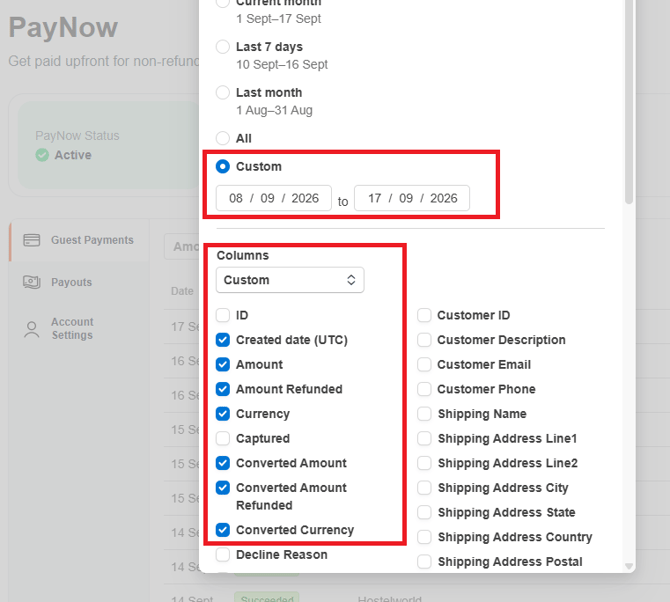
- Under Date Range, select Custom so you can easily reconcile the report with the weekly payment received. Keep in mind that each weekly payout includes bookings made from the previous Tuesday through the current Monday, with payment issued on Wednesday. Enter the start and end dates you need, as both are required.
- Under Columns, select the fields you want to include in the file. We recommend the following fields. You don’t need to select Booking ID, as it is already included in the exported file:
- Created Date;
- Amount;
- Amount Refunded;
- Currency;
- Converted Amount;
- Converted Amount Refunded;
- Converted Currency;
Once you download the report, you will be able to see the booking reference and the amount paid. The exported file will include only the transactions and information you selected.
(Due to time zones issues you may need to download an extra day to ensure all reservations paid within one payout are present in the report.)
Here’s a short video introducing this new feature: